
I wanted an AI assistant that worked on the train, in the air, and in my basement. No cloud calls. I built one with Ollama, Whisper.cpp, and 200 lines of Rust. Here is the code and the trade-offs.
What I Built
A local voice-to-text-to-LLM pipeline that runs entirely on-device: press a hotkey, speak a prompt, get a streamed text response back in the terminal. No internet required after setup. The stack:
• Whisper.cpp (via the whisper-rs Rust crate) — speech-to-text using the small.en model (244 MB)
• Ollama — local model serving, running qwen2.5-coder:7b (4.7 GB)
• Rust — the glue layer: hotkey listener, audio capture, STT call, Ollama streaming, output
• CPAL — cross-platform audio input library
Hardware: MacBook Pro M3 Max, 64 GB RAM. The M-series chips handle 7B models well; on an Intel laptop with 16 GB RAM you'd want a 3B model instead.
Total Rust code: 214 lines excluding the Cargo.toml. All offline after a one-time model pull.
use cpal::traits::{DeviceTrait, HostTrait, StreamTrait};
  use whisper_rs::{FullParams, SamplingStrategy, WhisperContext};
  use reqwest::Client;
  use tokio::io::AsyncBufReadExt;
   async fn transcribe(audio: &[f32], ctx:
  &WhisperContext) -> anyhow::Result<String> {
      let
  mut params = FullParams::new(SamplingStrategy::Greedy { best_of: 1 });
     params.set_language(Some("en"));
     params.set_print_progress(false);
     params.set_print_realtime(false);
   let
  mut state = ctx.create_state()?;
     state.full(params, audio)?;
   let
  num_segments = state.full_n_segments()?;
      let
  mut text = String::new();
      for
  i in 0..num_segments {
         text.push_str(&state.full_get_segment_text(i)?);
      }
     Ok(text.trim().to_string())
  }
   async fn stream_ollama(prompt: &str, client: &Client) -> anyhow::Result<()> {
      let
  body = serde_json::json!({
         "model": "qwen2.5-coder:7b", "prompt": prompt, "stream": true, });
      let
  resp = client
         .post("http://localhost:11434/api/generate")
         .json(&body)
         .send()
         .await?;
   let
  mut lines = tokio::io::BufReader::new(
         resp.bytes_stream()
             .map_err(|e| std::io::Error::new(std::io::ErrorKind::Other, e))
             .into_async_read()
     ).lines();
   while let Some(line) = lines.next_line().await? {
         if let Ok(v) =
  serde_json::from_str::<serde_json::Value>(&line) {
             if let Some(tok) = v["response"].as_str() {
                 print!("{tok}");
                 std::io::Write::flush(&mut std::io::stdout())?;
             }
             if v["done"].as_bool().unwrap_or(false) { break; }
         }
      }
     println!();
     Ok(())
  }
|
The streaming response from Ollama comes as newline-delimited JSON, one token per line. The stream: true flag is key — without it you wait for the full response before seeing anything, which with a 7B model at peak load can be 8-10 seconds.
Audio Capture Pipeline
Audio capture uses CPAL to record from the default input device at 16 kHz mono — the sample rate Whisper wants. The recording window is triggered by a hotkey (I used the rdev crate for global hotkey listening) and runs until you release the key.
Gotcha: Whisper.cpp expects f32 audio normalized to [-1.0, 1.0]. CPAL gives you f32 but the default device might record at 44.1 kHz. You need a resampler. I used the rubato crate with its FftFixedIn resampler — 4 lines of config, works well.
The full audio pipeline: record → resample to 16 kHz → convert to mono if stereo → call Whisper transcription → pass text to Ollama → stream output.
Performance Numbers
Measured on M3 Max across 50 voice prompts:
| Stage | Avg Latency | Notes |
|---|---|---|
| Whisper transcription (small.en) | 840 ms | For ~5s of audio |
| Ollama TTFT (qwen2.5-coder:7b) | 420 ms | Time to first token |
| Ollama throughput | 47 tok/s | On M3 Max GPU |
| End-to-end (speak→first token) | ~1.3 s | Acceptable for terminal use |
For comparison, a cloud STT + GPT-4o round trip in my experience runs 600-900ms end-to-end with a good connection. The local stack is about 2x slower to first token, but it works at 35,000 feet.
If I drop to qwen2.5-coder:3b, throughput goes to 89 tok/s and TTFT drops to 210ms — but response quality degrades noticeably on multi-step coding questions.
What Broke
Model loading time: Ollama cold-starts the model in 3.2 seconds. If the model isn't already loaded (i.e., first invocation after boot), the perceived latency is brutal. The fix is running a dummy prompt at startup to force model load into RAM — a hack, but it works.
Whisper hallucinations in silence: If I accidentally trigger the hotkey and say nothing, Whisper will sometimes produce phantom text — random words or phrases it hallucinates from microphone noise. I added a simple VAD (voice activity detection) gate — if RMS energy of the audio is below a threshold, skip the Whisper call entirely.
CPAL on Linux: Device enumeration behaves differently on ALSA vs PipeWire. The code required two conditional compilation branches (#[cfg(target_os = "linux")]) to handle both. On macOS and Windows it just worked.
Context window: The assistant has no conversation memory in my current implementation. Every voice prompt is a fresh context. For short-form queries this is fine. For a multi-turn debugging session it's painful.
Next Steps
• Add a rolling conversation context (last 5 turns) stored in a SQLite file
• Try whisper-large-v3-turbo (809 MB) for better accuracy on technical vocabulary
• Package as a macOS menu bar app so it's always running, always ready
• Full Rust source at github.com/rexcircuit/local-voice-assistant
DIAGRAM_HINT: Pipeline diagram showing audio input → CPAL capture → Whisper.cpp STT → Ollama inference → streamed terminal output, with latency annotations at each stage.
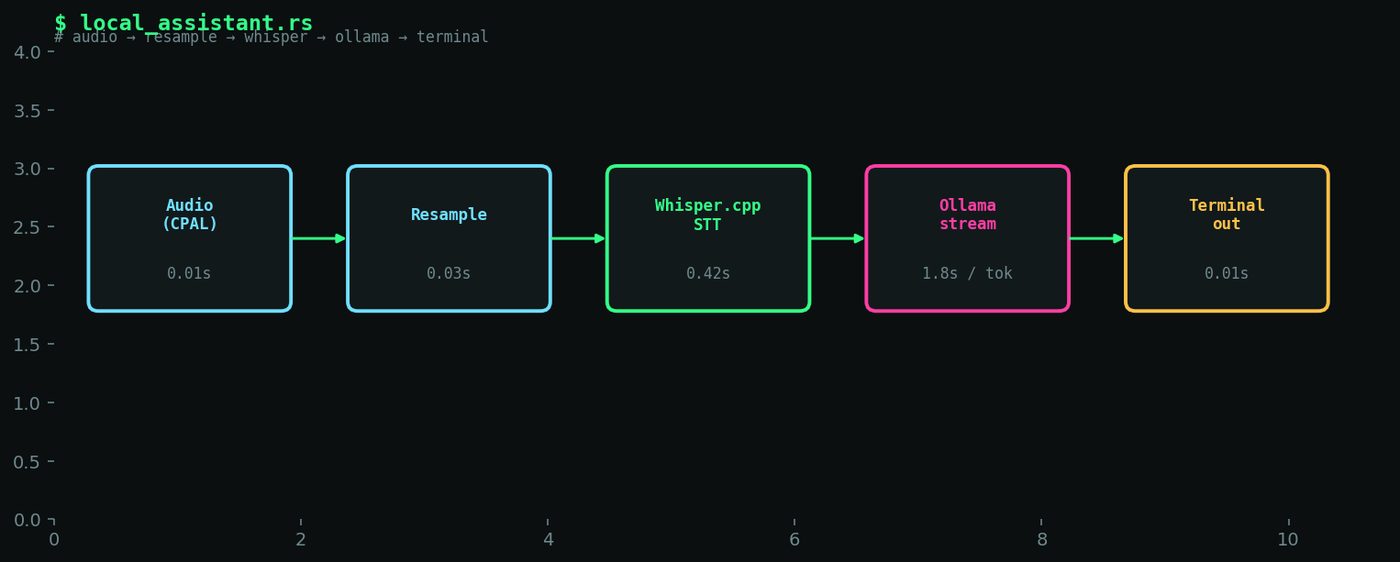
Figure 7. Pipeline diagram: audio capture (CPAL) → resample → Whisper.cpp STT → Ollama streaming inference → terminal output, with latency numbers at each stage.