

I let an agent handle Tier-1 support for 7 days. It resolved 64% of tickets without escalation. It also almost promised a refund it could not actually issue. Here is what held up and what did not.
|
THE STACK • GPT-4o • Zendesk API • LangGraph • Supabase • Cal.com |
Seven Days, One Agent, Questionable Decisions
Here's what I just tried: I handed our Tier-1 support queue to an AI agent for a full week. Not a chatbot — an actual LangGraph agent with tool access to Zendesk, our customer database in Supabase, and Cal.com for scheduling calls. The hypothesis was that 60%+ of our tickets were password resets, billing questions, and feature how-tos that didn't need a human at all.
The hypothesis was right. The agent also nearly issued a refund for $890 that it had no authority to approve. This is the story of both things.
The Stack
• GPT-4o — the reasoning model; handles intent classification, response drafting, and tool call decisions
• Zendesk API — reads tickets, posts replies, updates ticket status and tags, escalates to human queue
• LangGraph — agent orchestration with explicit state management; classify → research → respond → escalate
• Supabase — customer database with subscription status, usage history, and previous ticket history
• Cal.com — books calls with the support team for complex issues that need human resolution
The Architecture That Made It Safe (Mostly)
The LangGraph graph has four nodes with explicit transitions:
Classify: GPT-4o assigns one of seven intent types (password reset, billing inquiry, how-to, bug report, refund request, cancellation, other). Confidence below 0.8 → straight to escalation.
Research: pulls the customer record from Supabase, last 5 tickets from Zendesk, and relevant docs from a pgvector knowledge base.
Respond: drafts a reply and executes safe actions — password resets, plan lookups, feature walkthroughs, Cal.com bookings.
Escalate: for "refund request," "cancellation," or "bug report" intents, the agent posts a draft reply and flags for human review rather than sending autonomously. This is the guardrail that almost wasn't there.
The Week in Numbers
312 tickets total. The agent handled 200 autonomously (64.1%). Of those, 12 got negative follow-up ratings (6% negative rate — our human team runs about 4%, so slightly worse but not disqualifying). The agent correctly escalated 112 tickets.
Median response time on agent-handled tickets: 4 minutes, versus 6.2 hours for human-handled tickets. Customers don't know the agent is getting the easy tickets, and a 4-minute response on "how do I export my data" is genuinely better than waiting half a day.
Where It Almost Went Wrong
On day three, a customer wrote: "I'm super frustrated, I've had nothing but problems, I think I deserve some kind of refund for this month."
The intent classifier scored this as 0.61 on "how-to" and 0.71 on "refund request" — both below my 0.80 escalation threshold. My logic checked for "refund request" as the top intent, not as any high-scoring intent. The agent classified it as a hybrid case, slipped through, and drafted "I'd be happy to look into a partial credit for you" — a commitment it had no authority to make.
I caught it in my end-of-day review before it sent. The fix: escalate if any intent scores above 0.65 on a restricted category, regardless of the top label. One line of code that would have saved a very awkward customer situation.
What the Agent Can't Do (Yet)
Tickets with emotional complexity — frustrated customers, churning customers, people who've had a genuinely bad experience — get technically correct but tonally wrong responses. The agent is too measured. Humans de-escalate by matching energy slightly then redirecting. I'm using GPT-4o's tone-adjustment capabilities more aggressively in the system prompt for tickets a sentiment classifier upstream flags as "frustrated." Work in progress.
The Number
64% autonomous resolution rate, 4-minute median response time. At our current support cost of $18/ticket, automating 200 tickets per week saves about $3,600/week. Agent API cost: roughly $140/week. Weekly net saving: ~$3,460 — not nothing for an early-stage startup.
Try This
1. Audit your last 200 tickets and tag them by intent before you build anything. If fewer than 50% are simple retrieval or how-to questions, an agent won't get you to 60%+ autonomous resolution.
2. Build your LangGraph graph with explicit escalation nodes — hard-code restricted intents (refund, cancellation, billing disputes) and route them deterministically. Don't let the model decide when to escalate.
3. Set a 2-hour review window before any reply goes live in week one. You will catch something embarrassing.
4. Escalate on any high-scoring restricted intent, not just the top label. The multi-intent edge case is where your guardrails will fail first.
5. Log every agent decision with the full intent classification scores, not just the top label. You need to audit near-misses to find your guardrail gaps.
DIAGRAM_HINT: LangGraph state graph showing ticket ingestion from Zendesk → intent classification node → research node (Supabase + knowledge base) → respond node with Cal.com booking or escalate node → Zendesk reply or human review queue
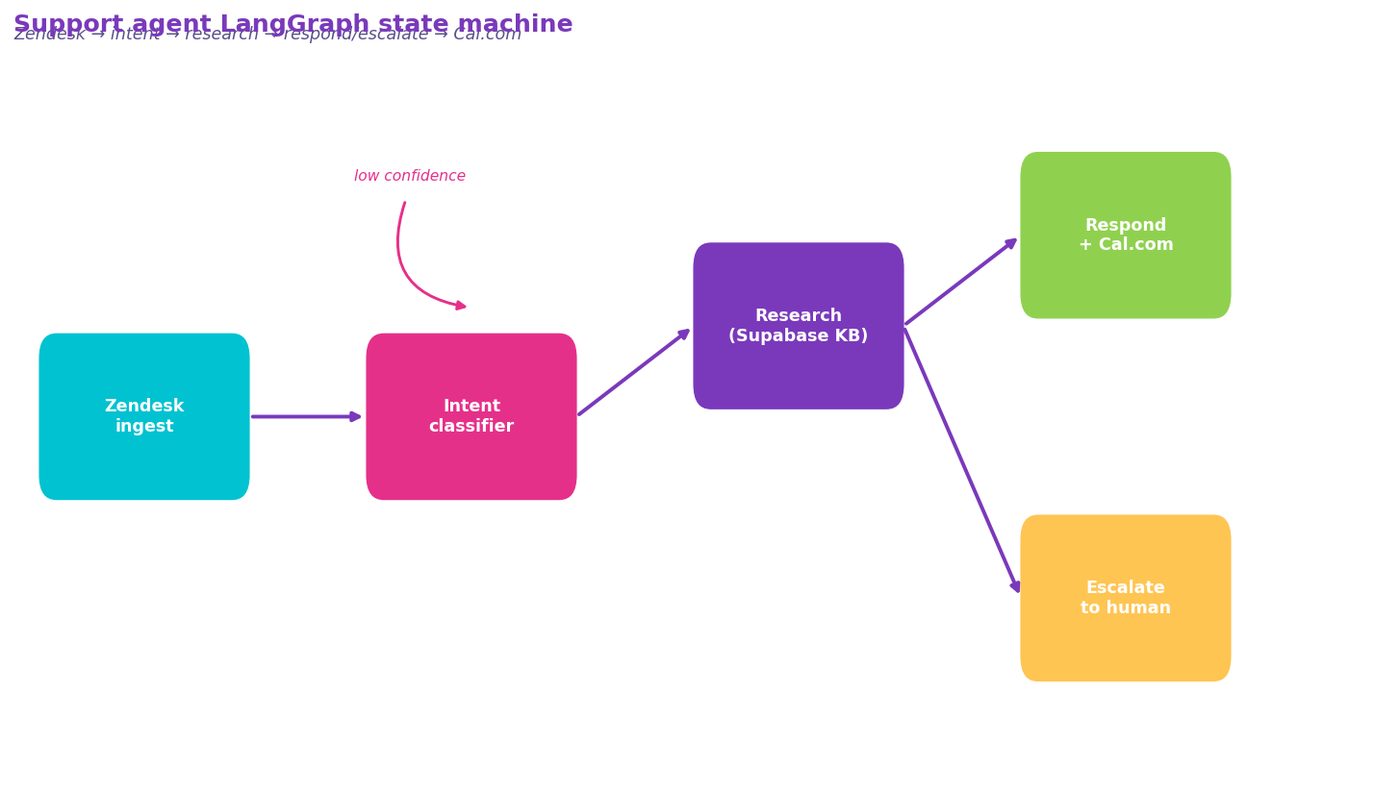
Figure 5. LangGraph state graph showing ticket ingestion from Zendesk → intent classification node → research node (Supabase + knowledge base) → respond node with Cal.com booking or escalate node → Zendesk r…
Comments (0)
Join the conversation!