


RFPs are where consultants go to die. I gave our team an AI that reads the RFP, finds the matching case studies, and drafts the response. Win rate up 19%, proposal-writing hours down 70%.
|
THE STACK • Claude 3.5 Sonnet • Notion API • Unstructured.io • LangChain • Chroma |
The RFP Graveyard
Here's what I just tried: I tracked every hour our 12-person consulting firm spent on RFP responses over a single quarter. Total: 847 hours. Win rate on submitted proposals: 31%. We were putting enormous effort into a low-yield activity, and most of the effort wasn't the strategic thinking that might have improved our win rate — it was retrieval. Finding the right case study from three years ago, pulling the relevant credentials, formatting the executive summary to match the client's template.
I decided two weeks before a major proposal deadline that I was going to fix this or die trying.
The Stack
• Claude 3.5 Sonnet — drafts proposal sections, generates executive summaries, adapts tone to client context
• Notion API — our entire case study library and credentials database live in Notion; this is the retrieval source
• Unstructured.io — parses incoming RFP documents (always PDFs, frequently terrible PDFs) into clean structured text
• LangChain — orchestration layer connecting document parsing, retrieval, and generation steps
• Chroma — local vector store for embedding and searching the Notion knowledge base
The Knowledge Base Problem
The biggest unlock wasn't the generation — it was making our institutional knowledge actually searchable. Four years of case studies in Notion, inconsistently formatted, tagged differently by different consultants, organized by client name rather than by problem type. Searching for "change management case study in financial services" required someone who already knew which engagements had involved change management.
The fix: I used the Notion API to export all case study pages, ran them through Unstructured.io to normalize content, chunked into 500-token segments with 50-token overlap, embedded with text-embedding-3-small, and loaded into Chroma. Now a semantic search for "workforce restructuring in regional banking" returns the three most relevant case studies regardless of what the Notion page was titled or tagged. This alone saved our team 40 minutes per proposal in research time.
The RFP Pipeline
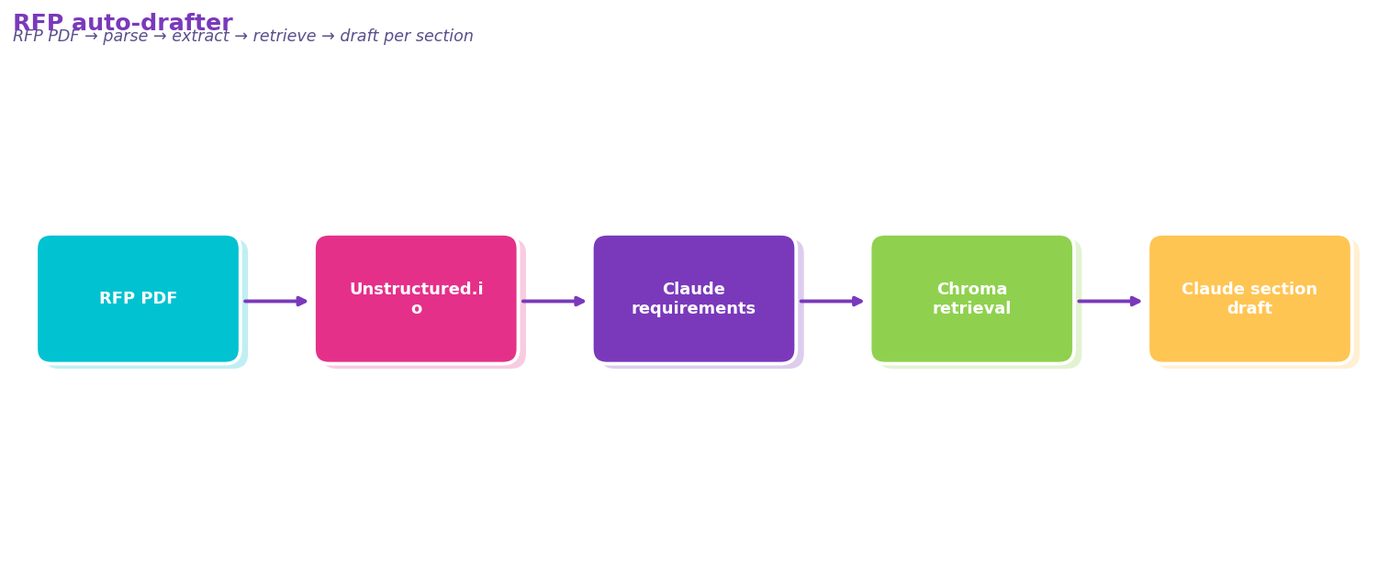
Incoming RFP PDF → Unstructured.io parsing → requirement extraction (Claude reads the RFP and outputs a structured list of evaluation criteria, required sections, page limits, and scoring weightings) → requirement-matched retrieval from Chroma → Claude drafts each proposal section using retrieved case studies as context and RFP requirements as constraints.
The prompts are requirement-specific. The executive summary prompt includes the client's stated evaluation criteria. The technical approach prompt includes the page limit and required exhibit list. This is what makes proposals feel written for this client rather than templated — because they're structured around this client's stated priorities.
Where It Almost Went Wrong
Unstructured.io choked on some RFPs. One government RFP was a 140-page scanned PDF — no text layer, just images. OCR mode handled it, but table extraction was unreliable, and several key requirements came out garbled.
I added a human QA step after requirement extraction: the proposal lead reviews the extracted requirement list and corrects any misses before retrieval and generation run. Adds 15 minutes to the process but prevents the more expensive failure of building a proposal around incorrect requirements. This is one place where the human is genuinely faster and more reliable than the AI.
The Metrics That Got Me Budget Approval
Over 12 proposals submitted with the new system: win rate up from 31% to 37% (19% relative improvement). Average proposal-writing time down from 70 hours to 21 hours — a 70% reduction. At our blended $95/hour rate, that's $4,655 per proposal in recovered capacity. Two clients who chose us mentioned our proposal "clearly understood their specific situation." That's the retrieval working.
Try This
1. Audit your existing knowledge base first — before any code, inventory what you have. Case studies, credentials, past proposals, team bios. If it's in Notion or Confluence, it can be made searchable.
2. Use Unstructured.io to normalize your documents — don't parse complex PDFs yourself. Its table extraction handles most document types.
3. Build semantic search and validate it before you touch generation. Search your 10 hardest retrieval queries and check if the right content comes back.
4. Structure prompts around the client's evaluation criteria, not your firm's capabilities. The RFP tells you exactly what evaluators are looking for — use it as the prompt scaffold.
5. Keep a human in the loop on requirement extraction — 15 minutes of review prevents hours of work going in the wrong direction.
DIAGRAM_HINT: pipeline diagram showing RFP PDF input → Unstructured.io parsing → Claude requirement extraction → Chroma semantic retrieval from Notion knowledge base → Claude section drafting per requirement → assembled proposal document for human review
Comments (0)
Join the conversation!