


Why Multi-Model Serving
Not every request needs a 70B parameter model. Our chat feature uses a fast 8B model. Code generation routes to a specialized 32B coding model. Complex reasoning tasks hit the full 70B. Running three separate GPU instances was expensive and underutilized — each was idle 60% of the time.
The idea was simple: one H100 80GB GPU, multiple models loaded dynamically, with a routing layer that selects the right model per request. vLLM's PagedAttention memory management makes this feasible by efficiently sharing GPU memory across models.
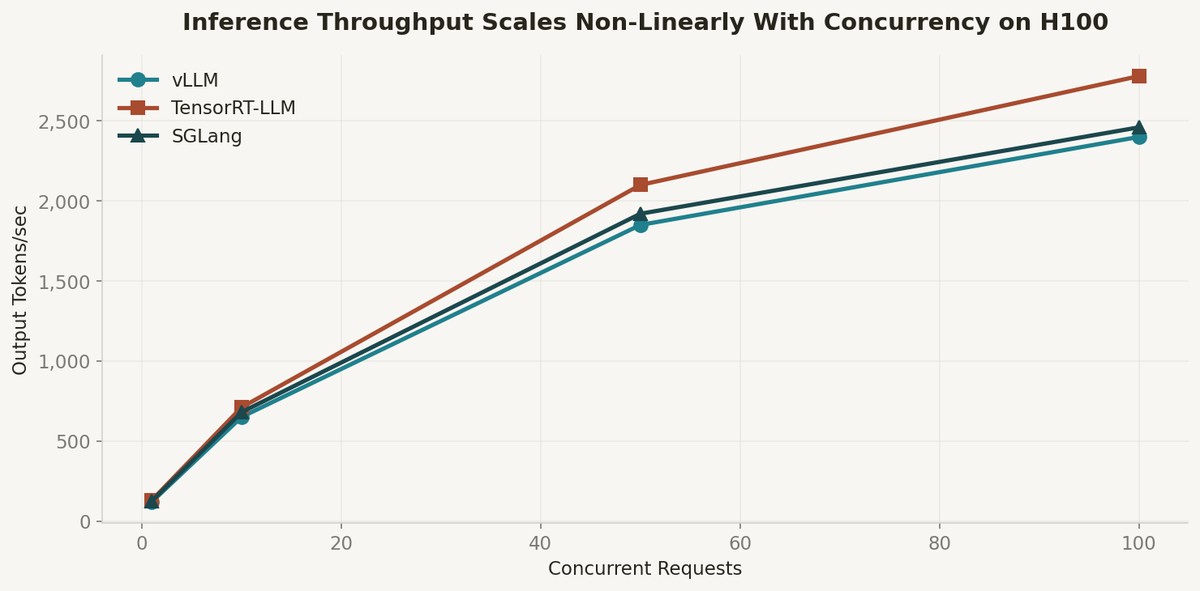
According to recent H100 benchmarks from Spheron, vLLM delivers 1,850 tokens per second at 50 concurrent requests with Llama 3.3 70B at FP8 precision. TensorRT-LLM edges it out at 2,100 tok/s, but vLLM's cold start time of 62 seconds versus TensorRT's 28 minutes made it the clear choice for multi-model serving where models need to be swapped.
The Architecture
The gateway is a FastAPI service with three components: a request classifier that determines which model to route to, a model manager that handles loading and unloading models on the GPU, and the vLLM serving engine that handles actual inference.
The model manager maintains a priority queue. The most-requested model stays resident in GPU memory. When a request arrives for a non-resident model, the least-recently-used model is evicted and the requested model is loaded. With vLLM's optimized model loading, swapping a 7B model takes about 8 seconds.
For the routing layer, I used a simple keyword-based classifier rather than an LLM — adding an LLM call to determine which LLM to call defeats the purpose. Pattern matching on the API endpoint plus request metadata (code language, conversation length, explicit quality flag) handles 95% of routing decisions.
Throughput Reality
At single concurrency, all three engines perform similarly — 120-130 tokens per second. The differentiation appears at scale. At 100 concurrent requests, TensorRT-LLM hits 2,780 tok/s versus vLLM's 2,400 tok/s. SGLang falls between at 2,460 tok/s but wins on VRAM efficiency with its RadixAttention KV cache management.
The throughput scales non-linearly with concurrency because continuous batching amortizes the cost of KV cache computation across requests. This is the core insight that makes multi-model serving viable — you do not need each model to be fast in isolation, you need the system to batch efficiently across diverse request patterns.
VRAM usage across all three frameworks is within 4GB of each other for the same model. The real constraint is max-model-len and gpu-memory-utilization settings. With careful tuning, I fit three models on a single H100: a 7B chat model (resident), a 32B code model (on-demand), and a 70B reasoning model (on-demand, FP8 quantized).
Operational Lessons
The hardest part was not inference — it was model lifecycle management. Deciding when to evict a model, handling requests that arrive during a model swap, and monitoring GPU memory fragmentation required more engineering than the inference layer itself.
Teams running optimized configurations on H100 GPUs with TensorRT-LLM typically see 2-4x throughput improvements versus default serving setups, according to GMI Cloud's benchmarks. But that optimization requires compilation steps that do not work well with dynamic model swapping.
My recommendation: start with vLLM for flexibility. Only move to TensorRT-LLM for your most-served model when you have proven that the throughput gain justifies the 28-minute compilation step. The vLLM blog has excellent documentation on production deployment patterns, and the fast.ai community has practical guides on performance tuning.
|
|
References
1. Spheron — vLLM vs TensorRT-LLM vs SGLang Benchmarks 2026 — https://www.spheron.network/blog/vllm-vs-tensorrt-llm-vs-sglang-benchmarks/
2. GMI Cloud — AI Inference Platform Benchmarks — https://www.gmicloud.ai/blog/ai-inference-platform-performance-benchmarks-2026
3. vLLM Blog — https://blog.vllm.ai/
4. Hugging Face Blog — https://huggingface.co/blog
5. fast.ai — https://www.fast.ai/
Comments (0)
Join the conversation!