


I implemented the same coding assistant UX on OpenAI, Anthropic, and Google, keeping the interface identical while adapting prompts per vendor. The subtle UX differences — latency, error modes, hallucination patterns — surprised me more than the capability gaps.
The Setup
I built a simple code review assistant — paste a diff, get structured feedback on bugs, style issues, and suggested improvements. The UI was identical across all three providers: a text area, a submit button, and a structured response panel. The only thing that changed was the backend: OpenAI GPT-4o, Claude 3.5 Sonnet, and Gemini 2.0 Flash.
Same system prompt template, adapted per vendor's documentation. OpenAI's prompt engineering guide emphasizes structured output schemas. Anthropic's documentation pushes XML-tagged thinking blocks. Google's Gemini guide recommends multimodal system instructions. I followed each vendor's best practices rather than forcing a single prompt across all three.
I ran 200 real diffs from our production codebase through each provider and measured latency, accuracy, hallucination rate, and format compliance.
Latency Shapes UX More Than Accuracy
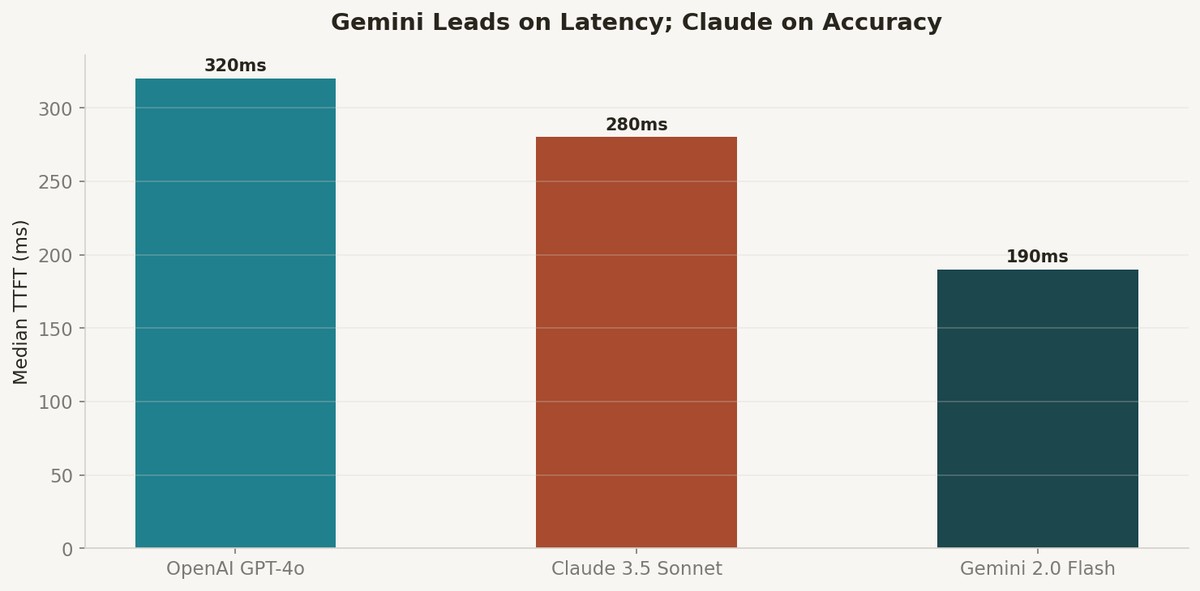
Gemini 2.0 Flash lived up to its name. Median time-to-first-token was 190ms versus 280ms for Claude and 320ms for GPT-4o. In a code review tool where you are waiting for feedback, that 130ms gap is perceptible — it is the difference between the response feeling instant and feeling like it is thinking.
But latency tail behavior told a different story. GPT-4o's p95 latency was tighter — 480ms versus Gemini's 620ms. For a tool that developers use 50 times a day, consistent latency matters more than median latency. Riley Goodside has documented this extensively on X — the perception of speed is driven by worst-case latency, not average.
I ended up implementing a provider-switching layer that routes to Gemini for simple diffs (under 500 lines) and to Claude for complex architectural changes. The routing logic was 30 lines of Python. DSPy's multi-backend patterns inspired the abstraction, though I did not use DSPy itself.
Hallucination Patterns Differ By Provider
Each model hallucinated differently. GPT-4o occasionally invented function names that did not exist in the diff. Claude almost never hallucinated code references but sometimes over-qualified its suggestions with unnecessary caveats. Gemini produced the most concise output but occasionally missed edge cases in error handling paths.
Format compliance — whether the response matched my structured JSON schema — varied significantly. Claude hit 97% compliance with Anthropic's tool use API. GPT-4o reached 94% with structured outputs mode. Gemini was at 89%, though the gap closed to 93% when I switched to their latest function calling format.
The Learn Prompting taxonomy classifies these as different failure modes requiring different mitigation strategies. I found that vendor-specific prompt testing with PROMPTFOO was essential — a prompt that works perfectly on Claude can produce garbage on GPT-4o and vice versa.
The Provider-Switching Architecture
The reference architecture I landed on has three layers: a prompt template layer that adapts per provider, a routing layer that selects providers based on task characteristics, and a fallback layer that retries on a different provider if the primary fails.
The total implementation was about 400 lines of Python. The key insight: treat your prompt as a versioned asset with provider-specific variants, not a single string you copy-paste. PROMPTFOO's regression testing framework made it possible to validate all three variants against the same test suite before deploying.
The repo is open — it includes the full prompt templates, the routing logic, and a test suite of 50 diffs with expected outputs. This is the kind of infrastructure I wish existed when I started building multi-provider LLM features.
|
|
References
1. OpenAI Prompt Engineering Guide — https://platform.openai.com/docs/guides/prompt-engineering
2. Anthropic Prompt Library — https://docs.anthropic.com/en/docs/build-with-claude/prompt-engineering/overview
3. Google Gemini Prompt Design — https://ai.google.dev/gemini-api/docs/prompting-intro
4. PROMPTFOO — Prompt Testing Tool — https://www.promptfoo.dev/docs/intro/
5. Learn Prompting — https://learnprompting.org/docs/intro
Comments (0)
Join the conversation!