


A small delivery operation I help. Route planning took 90 minutes every morning. I wired Gemini to their ops sheet and the job runs in 20 minutes with fewer errors. Here is the prompt architecture.
|
THE STACK • Gemini 2.0 Pro • Google Sheets API • Mapbox • Make.com • GitHub Actions |
Ninety Minutes Every Morning Before a Single Package Moved
Here's what I just tried: I volunteer a few hours a week helping a nonprofit food delivery operation that serves about 80 households across a mid-sized city. Every morning, one coordinator spent 90 minutes manually building delivery routes — pulling the day's orders from a Google Sheet, figuring out which driver could handle which neighborhood based on vehicle capacity and availability, and sequencing stops in her head.
She was good at it — years of experience meant she'd internalized traffic patterns, customer quirks (Mrs. Kowalski needs a ground-floor drop), and driver preferences. But when she was out sick, the backup process was a disaster. I asked if I could try something.
Three weekends later: 20 minutes, fewer errors, and the institutional knowledge is now in the system prompt instead of one person's head.
The Stack
• Gemini 2.0 Pro — the routing agent; handles multi-constraint optimization reasoning and produces structured route assignments
• Google Sheets API — reads the daily order manifest and driver availability; writes back finalized route assignments
• Mapbox — provides driving time estimates between stops via the Directions Matrix API
• Make.com — orchestrates the daily automation trigger and data flow between Sheets, Mapbox, and Gemini
• GitHub Actions — runs a scheduled job at 6 AM every weekday that kicks off the Make.com scenario
Why Gemini for Routing?
I evaluated GPT-4o and Claude 3.5 Sonnet for this task too. Gemini 2.0 Pro won on long-context multi-constraint reasoning — the daily manifest has up to 80 deliveries with a dozen constraints (vehicle capacity, driver availability windows, customer time-of-day preferences, neighborhood clustering) and Gemini handled the full context most reliably in my informal tests. The native Google Sheets integration was also a practical advantage.
The Prompt Architecture
The system prompt has four sections:
Role and context: "You are a logistics coordinator for a food delivery nonprofit. Your goal is to assign deliveries to drivers in a way that minimizes total drive time while respecting all constraints."
Constraints list (loaded dynamically from a config Sheet): vehicle capacities, driver availability windows, max deliveries per driver, neighborhood preferences and avoidances, customer notes (accessibility requirements, preferred drop times).
Mapbox time matrix: I pre-compute driving time between all delivery addresses and the depot via Mapbox's Directions Matrix API and inject it as a formatted table. Gemini uses this to reason about stop sequencing without guessing distances.
Output format: explicit JSON schema — driver name → ordered stop list with estimated arrival times → total route duration. This writes directly back to the Sheet via the Sheets API.
The prompt is about 2,400 tokens on a typical day.
Where It Almost Went Wrong
The first version ignored soft constraints. Hard constraints (vehicle capacity, driver availability) were respected perfectly. Soft constraints ("Driver Marcus avoids the north side after 10 AM" or "Mrs. Kowalski needs delivery before noon") were inconsistently honored.
Fix: I made soft constraints explicit in the prompt format as scored preferences: {constraint: "north_side_after_10am", applies_to: "Marcus", weight: "high", type: "avoid"}. I also added: "For each soft constraint you cannot fully honor, include a note in the output explaining the trade-off." That note becomes a flag for the coordinator to review.
After this change, the coordinator's review time dropped to about 5 minutes. Previously she was re-routing about 30% of the agent's suggestions; now it's about 8%.
The Number
Route planning time: from 90 minutes to 20 minutes — a 4.5x reduction. The coordinator described it as "I went from building the route to checking the route." For a volunteer coordinator running a nonprofit, that 70-minute daily recovery is significant.
Mapbox API cost: about $0.004 per matrix computation. Gemini API cost: about $0.03 per daily run. Total daily automation cost: under $0.05.
Try This
1. Pre-compute your distance/time matrix with Mapbox before calling the LLM — don't ask the model to estimate driving times. Feed it real numbers from the Directions Matrix API.
2. Separate hard and soft constraints explicitly in your prompt — same field name, different weight values. Models honor explicit priority signals better than prose buried in notes.
3. Add a trade-off explanation requirement to your output format — any soft constraint the model can't fully honor should produce a human-readable note. This makes the review step fast instead of exhaustive.
4. Use GitHub Actions for the morning trigger — a cron job at 6 AM hitting your Make.com webhook is more reliable than a manual trigger and costs nothing.
5. Load all configuration from a Google Sheet rather than hardcoding it in your prompt — the coordinator can update driver preferences and vehicle capacities without touching any code.
DIAGRAM_HINT: automation diagram showing GitHub Actions 6 AM cron → Make.com scenario → Google Sheets API (read daily manifest and driver availability) → Mapbox Directions Matrix API (drive time computation) → Gemini 2.0 Pro routing agent → structured JSON route assignments → Google Sheets API (write back routes) → coordinator review dashboard
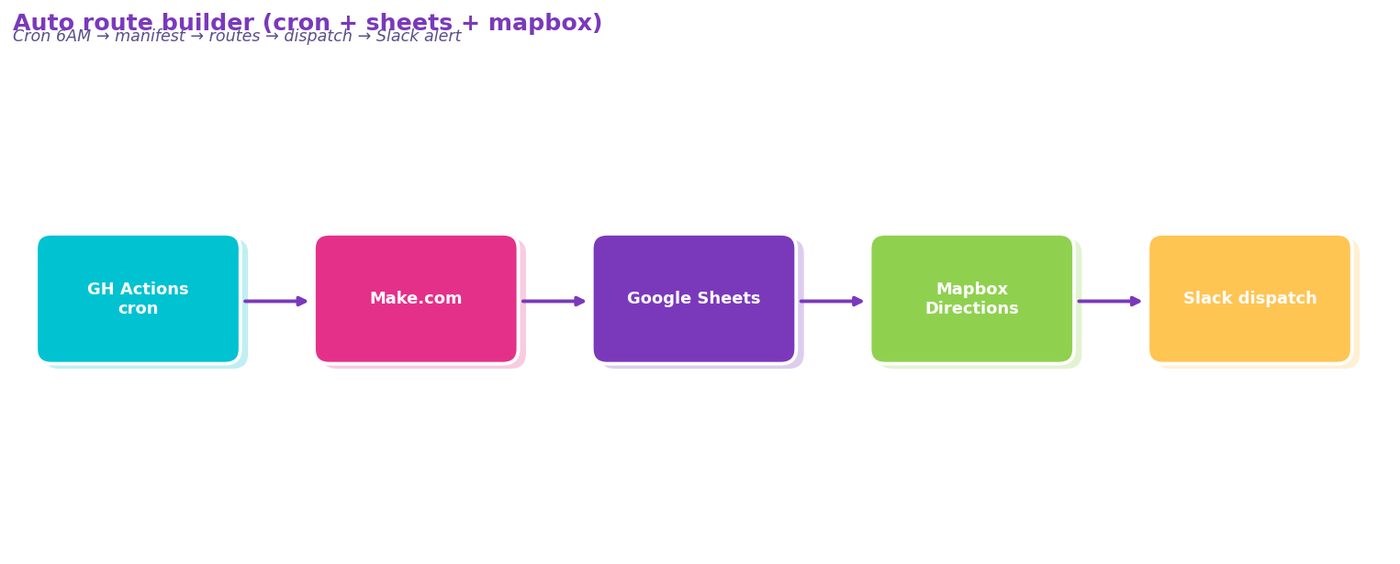
Figure 11. automation diagram showing GitHub Actions 6 AM cron → Make.com scenario → Google Sheets API (read daily manifest and driver availability) → Mapbox Directions Matrix API (drive time computation) → G…
Comments (0)
Join the conversation!