
I deconstructed a non-trivial agent workflow in LangGraph, then re-implemented it as a plain Python state machine with queues. The comparison revealed when frameworks help and when they hide the problems you need to see.
Why I Rebuilt It
I had a LangGraph workflow that routed customer support tickets — classifying intent, pulling context from a RAG pipeline, drafting a response, and routing to human review when confidence was low. It worked. It was also impossible to debug when it did not.
LangGraph's StateGraph API is elegant. You define nodes, wire edges, add conditional routing. The 2026 edition supports human-in-the-loop via interrupt(), typed state with reducers, and supervisor patterns for multi-agent coordination. With 27,100 monthly searches, it is the most adopted multi-agent framework by a significant margin.
But when my routing node produced an unexpected classification, tracing the state through LangGraph's graph execution felt like reading assembly. I wanted to see every state transition, every decision point, every retry — in my own logging format, with my own breakpoints.
The State Machine Version
The rebuild took a weekend. My state machine was 340 lines of Python — a TypedDict for state, a dictionary mapping states to handler functions, and a simple while loop that called the current handler and advanced to the next state based on its return value.
Every state transition logged to structured JSON. Every LLM call was wrapped in a retry decorator with exponential backoff. The routing decision was a plain if/elif block that I could step through in a debugger.
The LangGraph version was 180 lines, but it depended on LangGraph's runtime for state management, error handling, and execution flow. My state machine was longer but had zero framework dependencies beyond the LLM client.
What I Measured
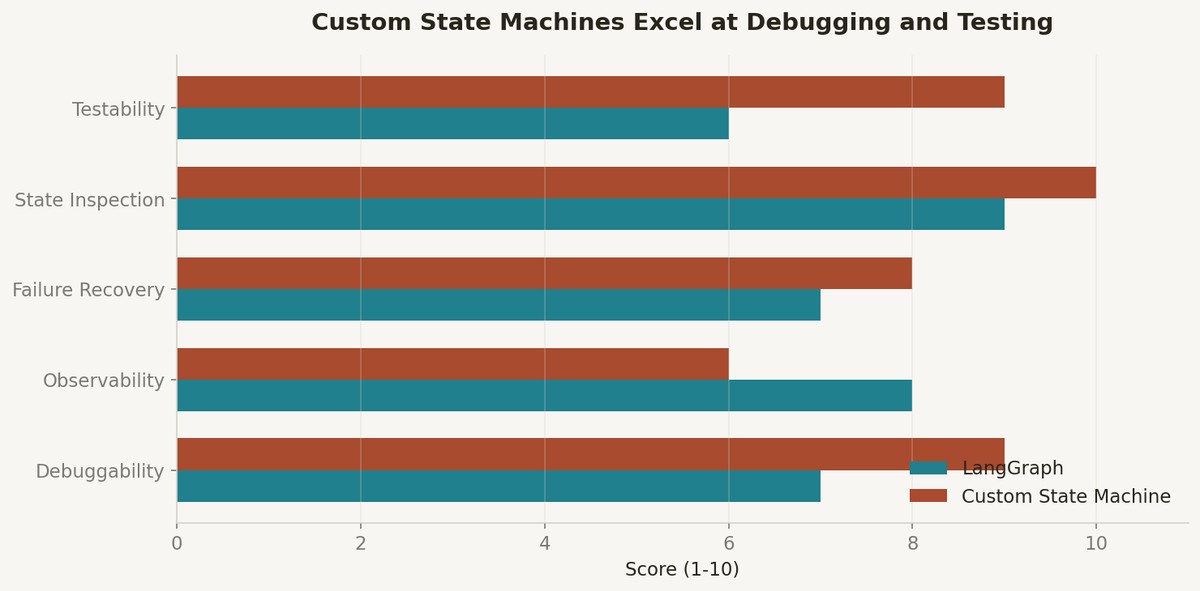
Debuggability was night and day. In the custom state machine, I could set a breakpoint on any state handler and inspect the full state dictionary. In LangGraph, the state was wrapped in framework objects that required understanding LangGraph's internal reducer semantics.
Failure recovery was more explicit in the custom version. When an LLM call failed, my retry logic was visible in the handler function. In LangGraph, retry behavior depended on how you configured the graph's error handling — which is powerful but requires reading documentation rather than code.
But LangGraph won on human-in-the-loop patterns. The interrupt() API for pausing execution and resuming after human approval is genuinely hard to replicate cleanly. The checkpointer-backed persistence means your workflow survives process restarts, which my in-memory state machine did not handle.
When to Use What
I now use a simple checklist: if your workflow needs persistent state across process restarts, human-in-the-loop approval, or dynamic fan-out across variable numbers of sub-tasks, use LangGraph. The Send API for parallel branches and the MemorySaver checkpointer are not things you want to rebuild.
If your workflow is a fixed pipeline with known states and you need maximum observability, build a state machine. The Applied LLMs guide makes this case well — most production LLM features are deterministic pipelines with one or two LLM calls, not autonomous agents.
The agent framework landscape in 2026 — LangGraph, CrewAI, AutoGen, LlamaIndex Workflows — is mature enough that you should know what you are giving up when you use one. What you are giving up is direct control over execution flow. What you gain is infrastructure for the hard patterns: persistence, parallelism, and human coordination.
References
1. LangGraph 2026 Guide — https://www.linkedin.com/pulse/complete-guide-langgraph-2026-edition-learnbay-esb7c
2. LangGraph Agent Patterns — DEV Community — https://dev.to/irubtsov/three-langgraph-agent-patterns-that-replaced-hundreds-of-lines-of-glue-code-3a21
3. Applied LLMs — applied-llms.org — https://applied-llms.org/
4. Best Multi-Agent Frameworks 2026 — GuruSup — https://gurusup.com/blog/best-multi-agent-frameworks-2026
5. LangChain Blog — https://blog.langchain.dev/
Comments (0)
Join the conversation!