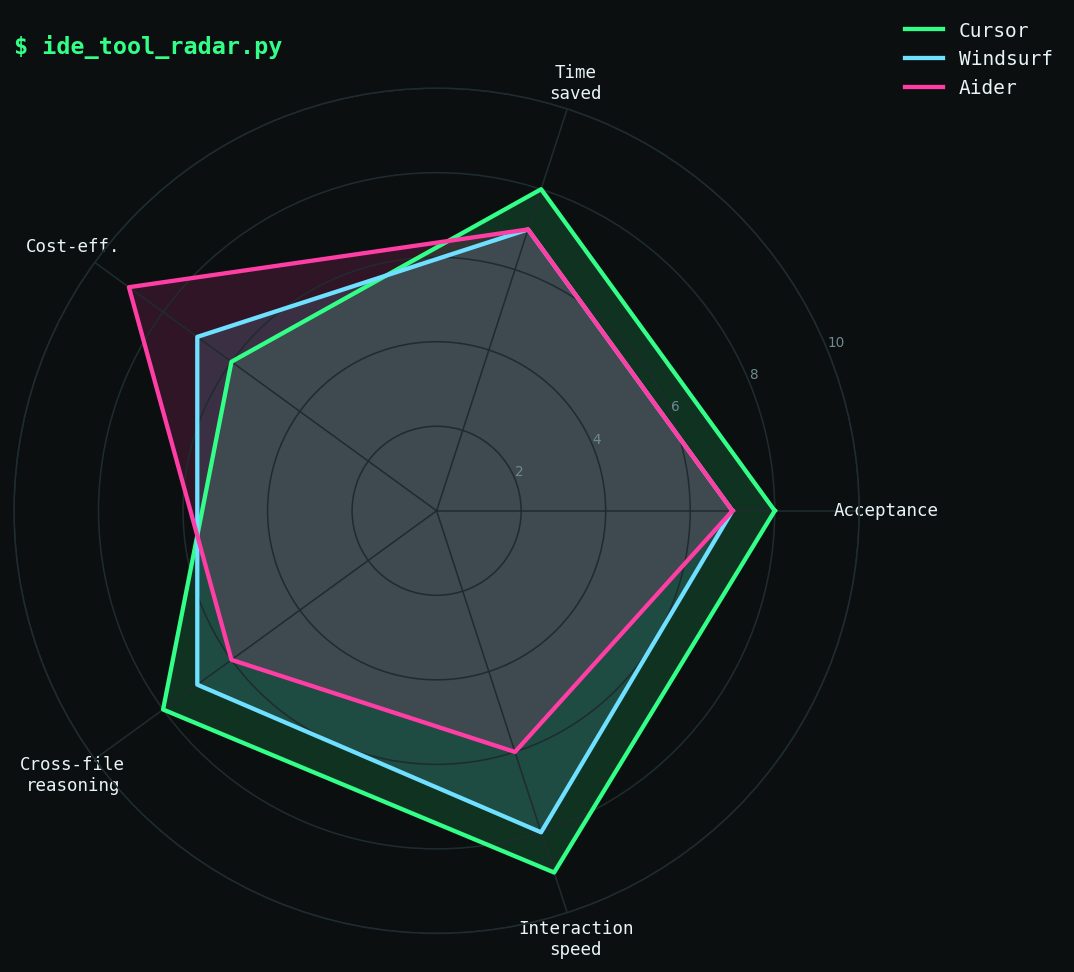


I used Cursor for 10 days, Windsurf for 10 days, and Aider for 10 days — same actual work — and logged every prompt and result. Here is the honest verdict and where each one won.
The Setup
I benchmarked three AI coding tools over 30 working days in April/May 2025. The work was real: maintaining a Python backend API, writing TypeScript for a small frontend, occasional Rust for a CLI tool, and reviewing PRs. Nothing was toy code.
Rules I set for myself:
• Use only the assigned tool for AI assistance during its 10-day window
• Log every AI prompt: tool used, prompt length, acceptance/rejection of output, time saved estimate
• Identical hardware throughout: MacBook Pro M3 Max, VS Code as the editor host (Cursor and Windsurf are forks; Aider runs in terminal)
• Identical model where possible: Claude 3.7 Sonnet via each tool's BYOK/API path
Logged interactions: 284 total. Cursor: 112. Windsurf: 97. Aider: 75 (lower because terminal-based is slower to reach for).
My logging schema was a simple JSON file I updated manually after each session:
{ "tool": "cursor", "task": "refactor", "prompt_tokens": 340, "accepted": true, "edit_needed": false, "time_saved_min": 12 }
|
Cursor: The Comfortable Default
Cursor won on comfort. The autocomplete is the best of the three — not just tab-completion but multi-line context-aware suggestions that felt like pair programming. The Cmd+K inline edit and Cmd+L chat window integrate naturally into an editor workflow that already lives in VS Code muscle memory.
Acceptance rate (accepted without significant edit): 71% of completions. Estimated time saved: 8.4 hours over 10 days. Cost: $20/month Pro plan, which I was already paying.
Where Cursor stumbled: large-context tasks. When I needed it to understand a change spanning 5+ files, the context window filling up was a real problem. The @codebase command helps, but it's doing retrieval-augmented lookup, not full-context reasoning. It missed inter-file dependencies three times in ways that cost me debugging time.
Also: the auto-apply feature occasionally staged changes I didn't want staged. I turned it off by day 3.
Windsurf: The Agentic Challenger
Windsurf's big differentiator is Cascade — its multi-step agent that can plan and execute a sequence of edits across your repo. For the right tasks this is genuinely impressive. I gave it "add input validation to all POST endpoints in the API" and it identified 7 endpoints, wrote consistent validation code for all 7, and updated the tests. That took about 20 minutes of mostly waiting and reviewing.
Acceptance rate: 66% of completions. Estimated time saved: 9.1 hours over 10 days (highest of the three). Cost: $15/month Pro plan.
The catch: Cascade goes wrong in interesting ways. On two occasions it made edits that were locally correct but broke something elsewhere — once it updated a function signature without finding all the call sites. It also has a habit of being overconfident and making more changes than you asked for. The diff review step is not optional with Windsurf.
The VS Code compatibility was 95% there. Two extensions I rely on had minor display glitches in the Windsurf fork that Cursor doesn't have.
Aider: The Terminal Honest Broker
Aider is the odd one out — no GUI, lives in your terminal, talks to your repo via git. This sounds like a regression but it's actually an advantage in one specific way: Aider is explicit. You can see exactly what it's doing, what files it touched, and every change goes through a git diff before it lands. There's no magic staging.
Acceptance rate: 78% — highest of the three. Estimated time saved: 6.2 hours over 10 days (lowest, partly due to slower interaction loop). Cost: API costs only, ~$8 over 10 days with Claude 3.7 Sonnet.
Aider's --architect mode (separate planning and editing passes) improved the acceptance rate noticeably on complex tasks. The repo-map feature — where Aider builds a tree-sitter based outline of your entire codebase — means it handles cross-file changes better than Cursor's retrieval approach. I had zero cases of missed inter-file dependencies.
What Aider can't do: anything that needs the editor UI. It doesn't help with autocomplete. If you forget to include a file in the context, you have to /add it manually. The onboarding is steeper than Cursor or Windsurf.
The Honest Scoreboard
| Metric | Cursor | Windsurf | Aider | |---|---|---|---| | Acceptance rate | 71% | 66% | 78% | | Time saved (hrs/10 days) | 8.4 | 9.1 | 6.2 | | Cost (10 days) | $6.67 | $5.00 | ~$8 | | Best for | Daily autocomplete | Multi-file agent tasks | Cross-file refactors | | Worst for | Large context reasoning | Knowing when to stop | Interactive coding flow |
What Surprised Me
Windsurf saved me the most raw time but felt the least trustworthy. That's a hard trade-off to explain to someone who hasn't used it. With Cursor I know the blast radius of a bad suggestion. With Windsurf, Cascade can get three files deep before you realize it went sideways.
Aider's higher acceptance rate was a surprise. I expected the terminal workflow to feel clunky enough that I'd be less selective. The opposite happened — the explicit diff-before-apply loop made me read the output more carefully and push back on things I might have passively accepted in Cursor.
I also noticed that Aider is a very active open source project — it appears on GitHub Trending regularly and ships changes fast. The codebase tooling improved visibly during my 10-day window.
Next Steps
• Extend to a 60-day window to smooth out task variance (10 days is a small sample)
• Test the same tools on a new greenfield project vs. maintenance work — the ratios may flip
• Try Aider with a local model (Qwen 2.5 Coder 32B via Ollama) to cut the API cost
• Raw logs and analysis script at github.com/rexcircuit/editor-ai-bench
DIAGRAM_HINT: Radar chart comparing Cursor, Windsurf, and Aider across five dimensions: acceptance rate, time saved, cost-efficiency, cross-file reasoning, and interaction speed.